Loading...
Searching...
No Matches
AParadiseLobbyInteractiveAvatar Class Reference
로비 화면에서 메인 캐릭터를 표시하고, 상호작용(터치) 시 스플라인을 따라 이동하는 뷰/컨트롤러 클래스 More...
#include <ParadiseLobbyInteractiveAvatar.h>
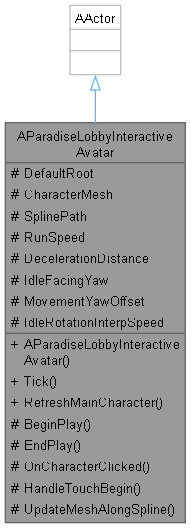
Inheritance diagram for AParadiseLobbyInteractiveAvatar:
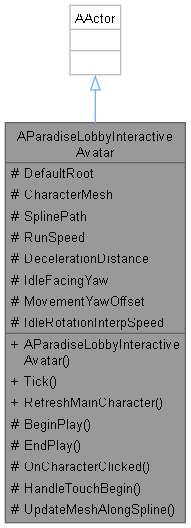
Collaboration diagram for AParadiseLobbyInteractiveAvatar:
Public Member Functions | |
| virtual void | Tick (float DeltaTime) override |
| void | RefreshMainCharacter () |
| 현재 편성된 메인 캐릭터 데이터를 읽어와 메시와 애니메이션 시퀀스를 갱신합니다. | |
Protected Member Functions | |
| virtual void | BeginPlay () override |
| virtual void | EndPlay (const EEndPlayReason::Type EndPlayReason) override |
| void | OnCharacterClicked (UPrimitiveComponent *TouchedComponent, FKey ButtonPressed) |
| 캐릭터 메시를 마우스로 클릭했을 때 호출되는 이벤트 함수 | |
| void | HandleTouchBegin (ETouchIndex::Type FingerIndex, UPrimitiveComponent *TouchedComp) |
| 캐릭터 메시를 모바일에서 터치했을 때 호출되는 이벤트 함수 | |
| void | UpdateMeshAlongSpline (float Distance, float DeltaTime) |
| 스플라인 거리 기준으로 메시 위치와 회전을 업데이트하는 공통 함수 | |
Protected Attributes | |
| TObjectPtr< USceneComponent > | DefaultRoot = nullptr |
| 액터의 기본 루트 컴포넌트 | |
| TObjectPtr< USkeletalMeshComponent > | CharacterMesh = nullptr |
| 캐릭터 모델링을 렌더링하고, 상호작용(터치) 판정도 직접 담당하는 뷰 컴포넌트 | |
| TObjectPtr< USplineComponent > | SplinePath = nullptr |
| 터치 시 캐릭터가 이동할 궤도를 정의하는 스플라인 컴포넌트 | |
| float | RunSpeed = 600.0f |
| 스플라인을 따라 이동할 때의 목표 이동 속도 (Unreal Unit/s) | |
| float | DecelerationDistance = 200.0f |
| 스플라인 끝에서 이 거리 안으로 들어오면 감속 + 회전 시작 (언리얼 유닛) | |
| float | IdleFacingYaw = 100.0f |
| Idle 상태에서 캐릭터가 바라볼 월드 기준 Yaw 방향 | |
| float | MovementYawOffset = -90.0f |
| 스플라인 이동 중 메시 방향 보정 오프셋 Yaw | |
| float | IdleRotationInterpSpeed = 3.0f |
| Idle 복귀 후 카메라 정면을 바라볼 때 회전 보간 속도 | |
Detailed Description
로비 화면에서 메인 캐릭터를 표시하고, 상호작용(터치) 시 스플라인을 따라 이동하는 뷰/컨트롤러 클래스
시각적 표현과 상호작용 로직만 처리하며, 데이터는 GameInstance의 Data Table을 참조합니다.
Member Function Documentation
◆ HandleTouchBegin()
|
protected |
캐릭터 메시를 모바일에서 터치했을 때 호출되는 이벤트 함수
- Parameters
-
FingerIndex 터치한 손가락 인덱스 TouchedComp 터치된 컴포넌트
◆ OnCharacterClicked()
|
protected |
캐릭터 메시를 마우스로 클릭했을 때 호출되는 이벤트 함수
- Parameters
-
TouchedComponent 터치된 컴포넌트 ButtonPressed 눌린 마우스 버튼
◆ RefreshMainCharacter()
| void AParadiseLobbyInteractiveAvatar::RefreshMainCharacter | ( | ) |
현재 편성된 메인 캐릭터 데이터를 읽어와 메시와 애니메이션 시퀀스를 갱신합니다.
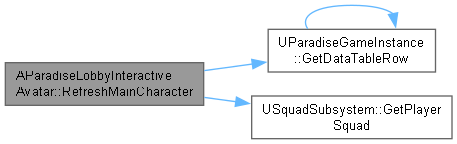
SquadSubsystem에서 ID를 가져와 FGachaPoolRow 데이터를 기반으로 View를 업데이트합니다.
Here is the call graph for this function:
◆ UpdateMeshAlongSpline()
|
protected |
스플라인 거리 기준으로 메시 위치와 회전을 업데이트하는 공통 함수
- Parameters
-
Distance 현재 스플라인 이동 거리 DeltaTime 프레임 델타 타임
Member Data Documentation
◆ DecelerationDistance
|
protected |
스플라인 끝에서 이 거리 안으로 들어오면 감속 + 회전 시작 (언리얼 유닛)
값이 클수록 더 일찍 감속합니다. (권장: 200 ~ 500)
◆ IdleFacingYaw
|
protected |
Idle 상태에서 캐릭터가 바라볼 월드 기준 Yaw 방향
카메라를 정면으로 바라보게 하려면 이 값을 에디터에서 조정하세요. 예: 카메라가 -Y 방향에 있으면 90.0f
◆ IdleRotationInterpSpeed
|
protected |
Idle 복귀 후 카메라 정면을 바라볼 때 회전 보간 속도
낮을수록 천천히 돌아봅니다. (권장: 2.0 ~ 5.0)
◆ MovementYawOffset
|
protected |
스플라인 이동 중 메시 방향 보정 오프셋 Yaw
캐릭터가 옆으로 달린다면 이 값을 90 또는 -90으로 조정하세요.
The documentation for this class was generated from the following files:
- Source/Paradise/Public/Actors/Squad/ParadiseLobbyInteractiveAvatar.h
- Source/Paradise/Private/Actors/Squad/ParadiseLobbyInteractiveAvatar.cpp